Salesforce Integration with Ruby on Rails for Real-time changes
Step-by-step guide to Salesforce Streaming API setup and Ruby on Rails integration using Restforce and Faye for real-time account and contact sync.
Also on Medium
Hello folks! After a long time I have started blogging again. Hope this blog helps you to setup Salesforce easily.
Overview
Salesforce is a large Customer Relationship Management tool, often times confusing, and is a tool built for handling lots of different jobs. Rails is lean, elegant, and designed specifically for making web development easier. It’s always good to read official documents for clear understanding. Although I have tried to included them as we would need for this project. We will fetch accounts and contacts from SF in real-time as it gets updated/added in SF.
I have tried to include all information needed for SF Integration with a RoR project.
Salesforce Streaming API
Salesforce Streaming API enables streaming of events using push technology and provides a subscription mechanism for receiving events in near real time. The Streaming API subscription mechanism supports multiple types of events, including PushTopic events, generic events, platform events, and Change Data Capture events. More
Push Technology
Push technology, also called the publish/subscribe model, transfers information that is initiated from a server to the client. This type of communication is the opposite of pull technology in which a request for information is made from a client to the server. More
How Client Connects to Salesforce
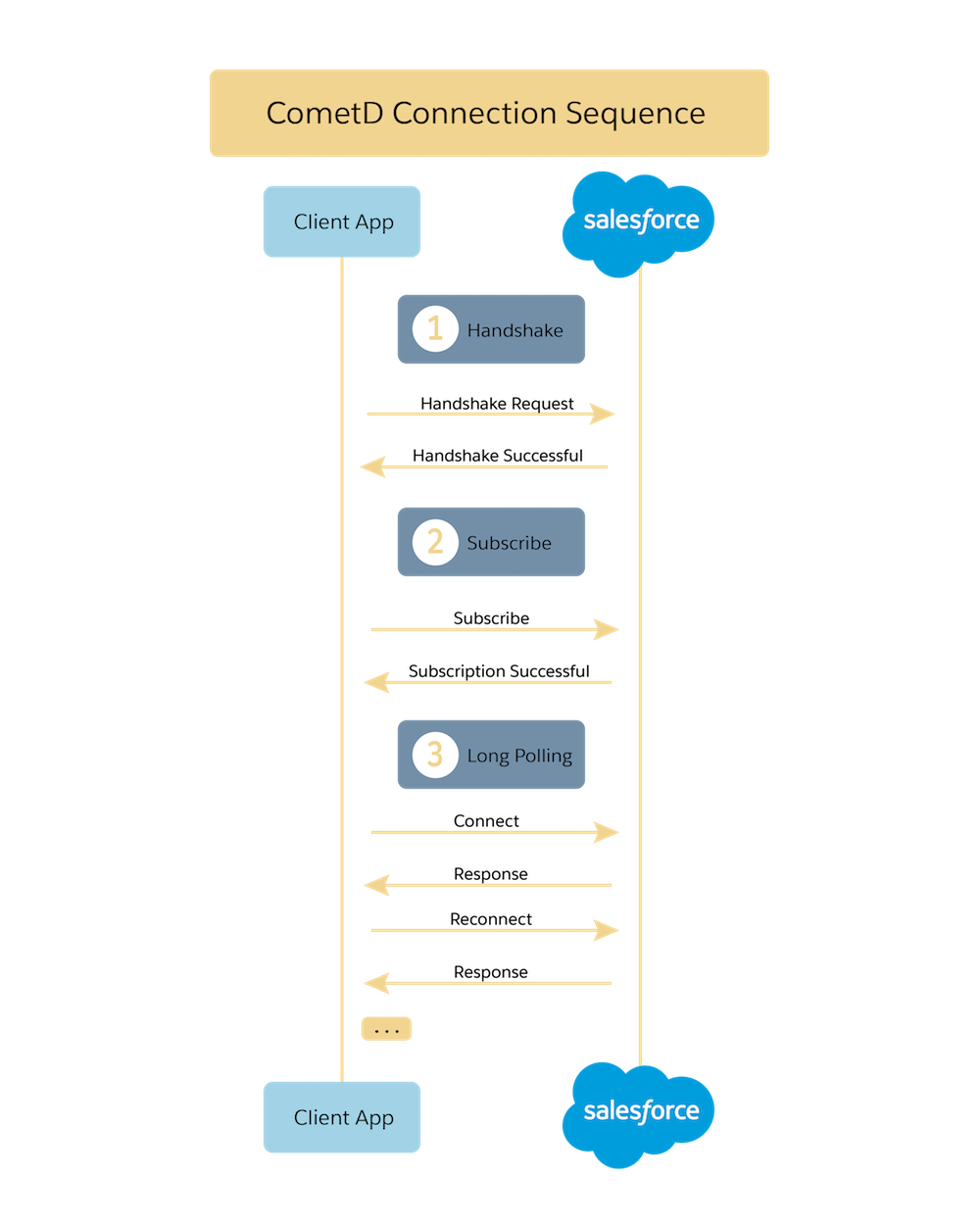
Streaming API uses the HTTP/1.1 request-response model and the Bayeux protocol (CometD implementation). A Bayeux client (our app) connects to Streaming API in multiple stages:
- CometD sends a handshake request.
- After a successful handshake, your custom listener on the
/meta/handshakechannel sends a subscription request to a channel. - CometD maintains the connection by using long polling.
Salesforce Setup
Please go through the official Salesforce documentation for detailed information on Streaming API. Here is a quick setup guide for Salesforce Integration with our app. Login to your Salesforce console.
User
A user is needed for communication between Salesforce and our app, as our app will communicate with Salesforce on behalf of the user. The user should have permissions to Read Accounts and Contacts.
Environment variables:
SF_USERNAME— User name of the userSF_PASSWORD— Password of the user
Security and the PushTopic Query
Subscribers receive notifications about records that were created, updated, deleted, or undeleted if they have:
- Field-level security access to the fields specified in the WHERE clause
- Read access on the object in the query
- CRUD access on the PushTopics
- Visibility of the new or modified record based on sharing rules
To receive notifications, users must have read access on the object in the PushTopic query and CRUD access on the PushTopic itself.
Enable Streaming API
- Go to Setup
- Search for User Interface
- Check enable Streaming API in Setup section
- Save
Create a Connected App
- Go to Setup → App → App Manager
- Click New Connected App
- Enable OAuth Settings with scopes for API access, refresh token, and offline access
- Enable Require Secret for Web Server Flow
Consumer key is your SF_CLIENT_ID and Consumer Secret is your SF_SECRET_ID.
OAuth Policies
- Permitted Users: All users may self-authorize
- IP Relaxation: Enforce IP restrictions
- Refresh Token Policy: Refresh token is valid until revoked
Network Access
Add the IP address range of your app to allow access.
Security Token
Go to User Settings → My Personal Information → Reset My Security Token. You will receive your SF_SECURITY_TOKEN by email.
Push Topics
Create two push topics — one for Accounts and one for Contacts:
ACCOUNT_PUSH_TOPIC_NAME="All_Accounts"CONTACT_PUSH_TOPIC_NAME="All_Contacts"
Topic names have a character limit of 25 and should be unique in your Salesforce org.
Project Setup
Now Salesforce setup is done, let’s go to our project. We will use restforce for SF integration. I assume you have respective models to save fetched data — one for account and another for contact — and a relationship between accounts and contacts.
Gems
Add these gems to your Gemfile:
gem 'cookiejar', git: 'https://github.com/MissionCapital/cookiejar.git'
gem 'faye', '0.8.9'
gem 'restforce', '~> 4.2.2'
Environment Variables
SF_USERNAME=
SF_PASSWORD=
SF_SECURITY_TOKEN=
SF_CLIENT_ID=
SF_SECRET_ID=
ACCOUNT_PUSH_TOPIC_NAME=All_Accounts
CONTACT_PUSH_TOPIC_NAME=All_Contacts
Salesforce Subscriber
Add a services directory within app. The SalesforceSubscriber class subscribes to the Salesforce Streaming API:
require 'restforce'
require 'faye'

class SalesforceSubscriber
  def initialize
    @client = Restforce.new(
      username: ENV['SF_USERNAME'],
      password: ENV['SF_PASSWORD'],
      security_token: ENV['SF_SECURITY_TOKEN'],
      client_id: ENV['SF_CLIENT_ID'],
      client_secret: ENV['SF_SECRET_ID']
    )
  end

  def create_account_push_topic
    @client.create('PushTopic',
      ApiVersion: '48.0',
      Name: ENV['ACCOUNT_PUSH_TOPIC_NAME'],
      Description: 'all account records',
      NotifyForOperations: 'All',
      NotifyForFields: 'All',
      Query: 'select Id, Name, Phone, Type, Ownerid, ParentId, IsDeleted from Account')
  end

  def subscribe
    EM.run do
      @client.subscription "/topic/#{ENV['ACCOUNT_PUSH_TOPIC_NAME']}" do |message|
        AccountParser.new(message).save_account
      end

      @client.subscription "/topic/#{ENV['CONTACT_PUSH_TOPIC_NAME']}" do |message|
        ContactParser.new(message).save_contact
      end
    end
  end
end
Rake Task
Create a rake task to subscribe:
namespace :streaming do
  desc 'Fetch updates of Accounts and Contacts from Salesforce push stream'
  task accounts_and_contacts: :environment do
    subscriber = SalesforceSubscriber.new
    subscriber.create_account_push_topic
    subscriber.create_contact_push_topic
    subscriber.subscribe
  end
end
Run:
rake streaming:accounts_and_contactsStarter Repository
Hope you finished the setup! If you get stuck at any point, here is the GitHub repository: RoR_Salesforce_Integration. Feel free to send a PR — you can use this codebase as a starter project for Salesforce integration with Rails.
Originally published on Medium.